Transform Your Photos with Halloween Volume 1 Digital Backgrounds
The Practical Magic of Digital Backdrops
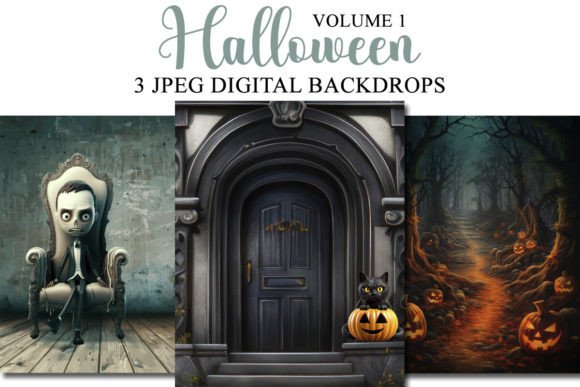
Setting up a Halloween photoshoot can be a logistical nightmare. Between sourcing props, managing storage, and controlling studio space, the creative process often takes a backseat to preparation. This is where Halloween Volume 1 Digital Backgrounds changes the game. These aren't just static images; they are complete, high-resolution environments designed to instantly transport your subjects into a spooky, atmospheric setting. The collection includes 3-4 meticulously crafted backdrops, each offering a distinct Halloween personality—from eerie, fog-filled forests to classic haunted house interiors. The appeal lies in their versatility and the immediate control they give you over the final composition.
Imagine you're a portrait photographer with a client who wants a whimsical, not-too-scary Halloween theme for their family card. Instead of building a set, you simply photograph your subjects against a neutral background with consistent, soft lighting. Later, in your editing software, you can seamlessly composite them into the Halloween Volume 1 Digital Backgrounds. The high-quality JPEG files at 300dpi and 3000x2400 pixels ensure that even when cropped or scaled, the detail remains sharp and professional. This method saves an enormous amount of time and money, eliminating the need for physical prop storage and complex set construction.
Integrating Digital Environments into Your Creative Workflow
These digital assets are built for flexibility. They function as layers in any competent photo editing program, which means your creative options are vast. For a graphic designer working on a local event poster, the backdrops can serve as a textured, atmospheric background for headline typography. The moody color palettes—deep oranges, blacks, and grays—naturally complement bold, sans-serif fonts or elegant script typefaces, creating immediate visual hierarchy and brand recognition for the event.
For social media managers and content creators, the utility is just as strong. You can create a series of cohesive Instagram posts or story templates by using the same backdrop across multiple images. This establishes a strong, professional brand identity for your Halloween campaign. The backdrops work exceptionally well for product photography too. A small business owner selling candles or jewelry can place their items on a digitally composited rustic wooden table from the collection, giving their online store a polished, thematic look without a professional studio. The key is to plan your lighting direction in the initial photo to match the light source implied in the digital backdrop for a believable composite.
Choosing and Using Your Digital Backdrops Effectively
With any design asset, the first step is evaluating fit. Not every project needs a high-drama, spooky atmosphere. Review the specific visuals of each backdrop in Halloween Volume 1 Digital Backgrounds. Is the mood playful or genuinely haunting? Does the composition have a clear focal point, or is it a neutral texture? This assessment will guide you. For a blogger creating a recipe post for "witches' brew" punch, a backdrop with a subtle, cauldron-like vignette might work perfectly. For a marketing email, a cleaner, less cluttered background might ensure your text remains the star.
When integrating these backgrounds, consider the principles of modern typography and visual balance. If your subject is a person, ensure the backdrop's complexity doesn't compete with them. You might need to apply a slight Gaussian blur to the digital background to create depth of field, mimicking a real camera lens. This technique helps direct the viewer's eye and improves readability for any overlaid text. The backdrops are compatible with a wide range of software, from Adobe Photoshop and Lightroom (using the ON1 plugin) to more accessible tools like PicMonkey and GIMP. This makes them a valuable commercial font and asset for professionals and hobbyists alike.
Ultimately, the value of a resource like Halloween Volume 1 Digital Backgrounds is measured by its ability to solve real problems and elevate creative output. It’s not about having the most assets, but about having the right, high-quality ones that integrate smoothly into your process. By saving you the overhead of physical setups, these digital backdrops free you to focus on what matters: capturing the perfect expression, designing a compelling layout, and delivering a polished, professional final product that resonates with your audience, whether they're clients, customers, or your own social media followers.